
Veo & Gemini Video Watermark Remover
Every frame of your Veo export carries their stamp — your shots, their logo. WatermarkRemover cleans it frame by frame inside your browser, keeps the audio untouched, and hands you back your video as a fresh MP4. No upload, no queue, no account.
Clean a video nowClean your clips
Every frame cleaned — at speed
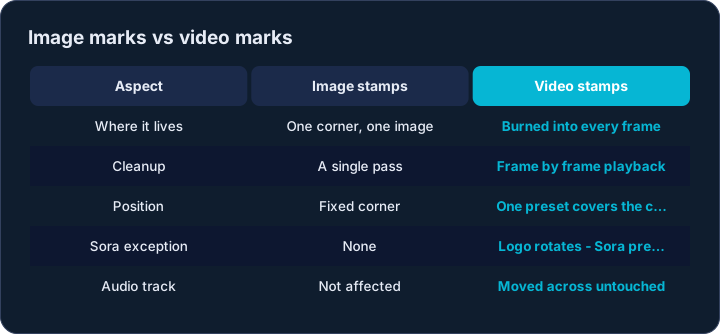
Video marks are different from image marks: the stamp is burned into every single frame, so a video cannot be cleaned with one operation. WatermarkRemover cleans each frame as it plays through, so the mark is gone everywhere — first frame to last. The mark never moves between frames, so one preset covers the whole clip.
It is fast: your computer’s own video hardware does the heavy lifting, so a 1080p clip typically processes at several times real time on a modern laptop — a one-minute video is usually ready in under thirty seconds. The output is a standard MP4 with the same resolution as the source, ready for any editor or feed.
Your audio track survives untouched
Sound is where many video tools quietly damage your file: they process the audio and lose a little quality each pass. WatermarkRemover leaves the audio exactly as it came out of the generator — voice-overs, music and lip sync arrive bit for bit identical to the source.
The same is true for the pictures: the clean clip keeps the same resolution and a matched bitrate, so file size lands in the same range you started with.
The clean file carries no trace of its source
Video files carry invisible luggage besides the picture: records of where the file came from and which tools touched it. The clean MP4 leaves all of that behind — what you download contains picture, sound and timing, nothing else.
One honest limit: Google’s SynthID is a watermark woven into the pixels themselves, and reliably detecting it requires Google’s own detector, which is not public. Any tool claiming to detect SynthID locally in a browser is making a claim you cannot verify — and neither can we, which is why we do not make it. What WatermarkRemover removes is the visible mark, plus the transferable metadata, verified by pixel-level checks before every release.
When the mark sits somewhere else
Reframed or cropped clips can carry the stamp in any corner. Pick the matching position pill and size before adding the file, and if a queued clip was added under the wrong preset, the Re-run button processes it again with the new settings — the original file is never modified on disk.
Batch works the way video work actually happens: drop a whole folder of takes, watch each one report its frame progress, then download every clean clip with one button. Processing runs one file at a time so a batch of long clips does not exhaust browser memory.

Which formats are supported?
MP4 and MOV with H.264 video — which is exactly what Veo, Flow and most phone cameras export. WebM input is on the roadmap. If the file opens in a video player but not here, it is likely H.265/HEVC; re-export as H.264 and it will process.
Does it work on the Sora watermark?
Yes — Sora 2’s logo hops between corners every few seconds, so a single-corner preset cannot cover it. Pick the Sora (moving) position and the tool cleans all four corners on every frame, so the mark is cleaned wherever it sits in its rotation. Details on the dedicated Sora Watermark Remover page.
Is the audio really kept?
Yes. Audio packets are moved across without being decoded or re-encoded, so the sound in the clean file is bit-for-bit what was in the original — including stereo layout and sample rate.
Are my videos uploaded anywhere?
No. Decoding, cleanup and re-encoding all run inside this browser tab using standard media APIs. You can load the page, go offline, and process clips with the network cable unplugged.
How long does a clip take?
As a rule of thumb: tens of seconds for a one-minute 1080p clip on a desktop, longer on phones and 4K. The progress bar reports the frame count as it goes, so you always know where you are.
Will there be quality loss?
The marked corner is cleaned; the rest of every frame is pixel-identical before re-encoding. Re-encoding uses the same H.264 profile and a matched bitrate, so in normal viewing the clean clip is indistinguishable from the source.